
Smartwatches have gone from a novelty gadget to a genuinely useful everyday device — tracking fitness, handling notifications, and in some cases replacing your phone for short stretches. But with dozens of models across wildly different price points and ecosystems, picking the right one isn’t just about brand name. This guide walks through exactly what to check before you buy.
How Do You Know If You Actually Need a Smartwatch?
A smartwatch isn’t for everyone. It’s worth the investment if:
- You want to track workouts, steps, heart rate, or sleep without carrying your phone
- You get frequent notifications and want to glance at your wrist instead of pulling out your phone
- You’re into a specific fitness goal (running, swimming, cycling) and want dedicated tracking
- You want contactless payments or basic phone-free connectivity on the go
If you rarely exercise and don’t mind checking your phone for notifications, a basic fitness band might be a cheaper, simpler fit instead. And if you’re generally reassessing your tech setup, it’s worth also checking the signs it’s time to upgrade your phone while you’re at it.
What Types of Smartwatches Are There?
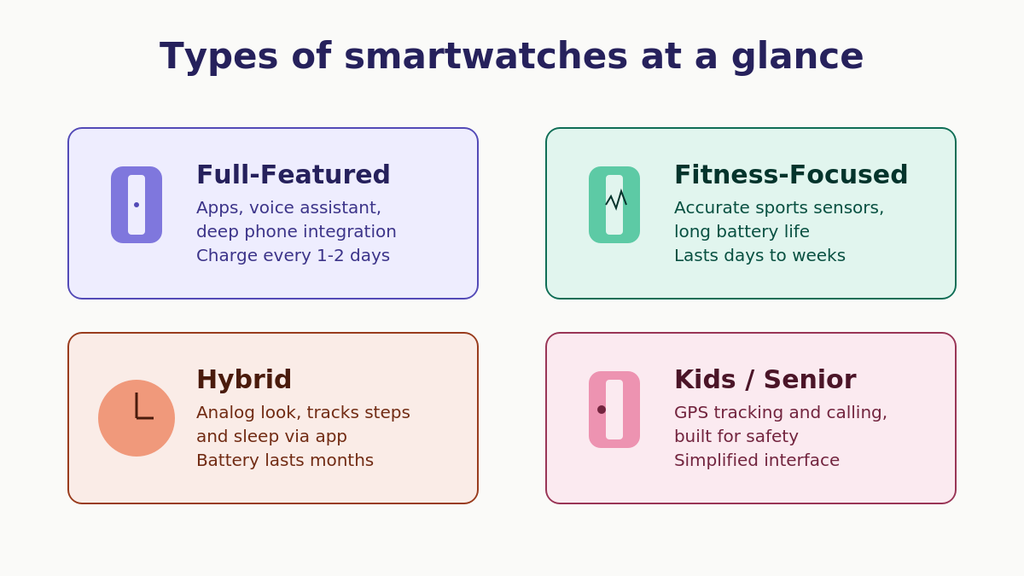
Full-Featured Smartwatches (Apple Watch, Wear OS, Galaxy Watch)
These run full app ecosystems, support voice assistants, app installs, and deep phone integration. Best if you want the most functionality and don’t mind charging every 1–2 days.
Check out the Apple Watch Series 11 (GPS, 42mm) as a solid example of a full-featured smartwatch with deep phone integration.
Fitness-Focused Smartwatches (Garmin, Fitbit-style)
Built primarily around health and workout tracking, with longer battery life (days to weeks) and more accurate sensors for sports-specific metrics.
Take a look at the Garmin Vívoactive 5, built for long battery life and sports tracking.
Hybrid Smartwatches
Look like a traditional analog watch but quietly track steps, sleep, and notifications through a companion app. Great if you want smartwatch features without the “tech” look or short battery life.
See the Withings ScanWatch 2, a hybrid smartwatch with ECG and SpO2 tracking that blends a classic look with health monitoring.
Kids’ and Senior-Focused Smartwatches
Simplified models with GPS tracking, calling, and safety features rather than full app support — designed for parental monitoring or ease of use.
Consider the 4G Kids Smart Watch Phone with GPS for safety-focused tracking and calling.
What Features Actually Matter When Choosing a Smartwatch?
1. How Compatible Is It With Your Phone?
This is the single biggest factor. Apple Watches only work fully with iPhones. Wear OS and Galaxy Watches work best with Android (Galaxy Watches in particular are heavily optimized for Samsung phones specifically). Check compatibility before falling in love with a specific model.
2. How Long Does the Battery Actually Last?
Battery life varies enormously by type:
| Smartwatch Type | Typical Battery Life |
|---|---|
| Full-featured (Apple/Wear OS) | 1–2 days |
| Fitness-focused (Garmin-style) | 5–14+ days |
| Hybrid | 2–6 months (often uses a coin cell) |
| Basic GPS/kids watches | 2–5 days |
If you don’t want to charge a watch nightly like a phone, lean toward fitness-focused or hybrid options. And if you’re often away from an outlet, a good portable power bank can keep both your watch and phone topped up on the go.
3. What Health and Fitness Sensors Does It Include?
Common sensors to look for:
- Heart rate monitor — standard on nearly all models now
- Blood oxygen (SpO2) — useful for sleep and altitude tracking
- ECG — available on some premium models, checks heart rhythm
- GPS — important if you want accurate outdoor run/ride tracking without your phone
- Sleep tracking — varies significantly in accuracy between brands
If fitness tracking is your main reason for buying, prioritize GPS accuracy and sensor quality over app features.
Watches with both SpO2 and ECG sensors are a strong pick if health tracking is your priority.
4. How Durable and Water-Resistant Is It?
Look at the water resistance rating:
- IP67/IP68 — splash and light submersion resistant, fine for showers and rain
- 5 ATM / 50m — safe for swimming and most water sports
- 10 ATM+ — suitable for more serious swimmers or divers
If you plan to swim regularly or work in rugged conditions, check for a higher ATM rating and a scratch-resistant display (sapphire crystal or reinforced glass).
5. What Display Type Should You Choose?
- AMOLED/OLED — vibrant, true blacks, better for always-on displays, but uses more battery
- Transflective/MIP displays — used on many fitness watches, readable in direct sunlight, much better battery efficiency
- E-ink style — extremely long battery life, minimal color, mostly on hybrid or ultra-budget models
If you’re outdoors often, sunlight readability matters more than color vibrancy.
6. Does It Support Cellular or Payments?
Some smartwatches offer an LTE/cellular option, letting you leave your phone at home for calls and texts. Others support NFC-based contactless payments (Apple Pay, Google Pay, Samsung Pay). Check whether these matter to you, since cellular models cost more and often require a separate carrier plan.
If you want to leave your phone at home, the Samsung Galaxy Watch 7 40mm LTE supports calls and texts on its own.
How Much Should You Spend on a Smartwatch?
Budget ($50–$150)
Covers basic fitness tracking, notifications, and decent battery life. A good entry point if you’re not sure you’ll stick with wearing a smartwatch daily.
A good example in this tier is the Samsung Galaxy Fit3, offering solid fitness tracking and up to 13 days of battery life.
Mid-Range ($150–$350)
Adds better sensors (SpO2, more accurate GPS), nicer displays, and broader app support. This tier covers most buyers’ needs without paying for premium extras.
Look for a well-rated model in this range from a trusted brand for the best balance of features and price.
Premium ($350+)
Includes ECG, cellular options, titanium/sapphire builds, and the most refined software experience. Best for people who want their smartwatch to fully replace certain phone functions.
For a top-tier option, consider the Samsung Galaxy Watch Ultra (2025), featuring a titanium casing, LTE, and dual-frequency GPS.
How Do You Make Your Smartwatch Battery Last Longer?
- Lower screen brightness and disable always-on display if not needed
- Turn off unused sensors (like continuous SpO2 tracking) when not actively needed
- Limit notification pushes to only essential apps
- Turn off GPS at all times other than during actual outdoor workouts
- Keep the software updated — manufacturers often improve battery efficiency in updates
Keep a 3-in-1 wireless charging stand handy so you’re never stuck with a dead battery.
So, How Do You Choose the Right Smartwatch for You?
Start with phone compatibility — that alone narrows your choices significantly. From there, decide whether daily charging is acceptable (full-featured) or if you’d rather have a week or more of battery life (fitness-focused or hybrid). Most people will find a mid-range option that balances sensors, battery, and price without needing to pay premium prices for features they won’t use.
Match the watch to how you’ll actually use it — daily notifications, serious training, or simple everyday tracking — rather than picking based on brand name alone. Pairing your new smartwatch with a solid set of wireless earbuds rounds out a complete everyday wearable tech setup.
Disclosure: As an Amazon Associate, we earn from qualifying purchases made through links on this page.
Pingback: How to Choose the Right Bluetooth Speaker