
USB-C cables may look almost identical, but they can have very different capabilities. One cable might be designed mainly for basic charging, while another can handle much higher power, faster data transfer, or both.
That is why choosing a USB-C cable based only on its appearance or the words “fast charging” on the package can lead to disappointment.
USB-C cables do not all have the same capabilities. Their power and data performance can vary depending on the cable’s specifications.
So, how do you choose the right USB-C cable? Here are the most important things to check before buying.
How to Pick the Right USB-C Cable?
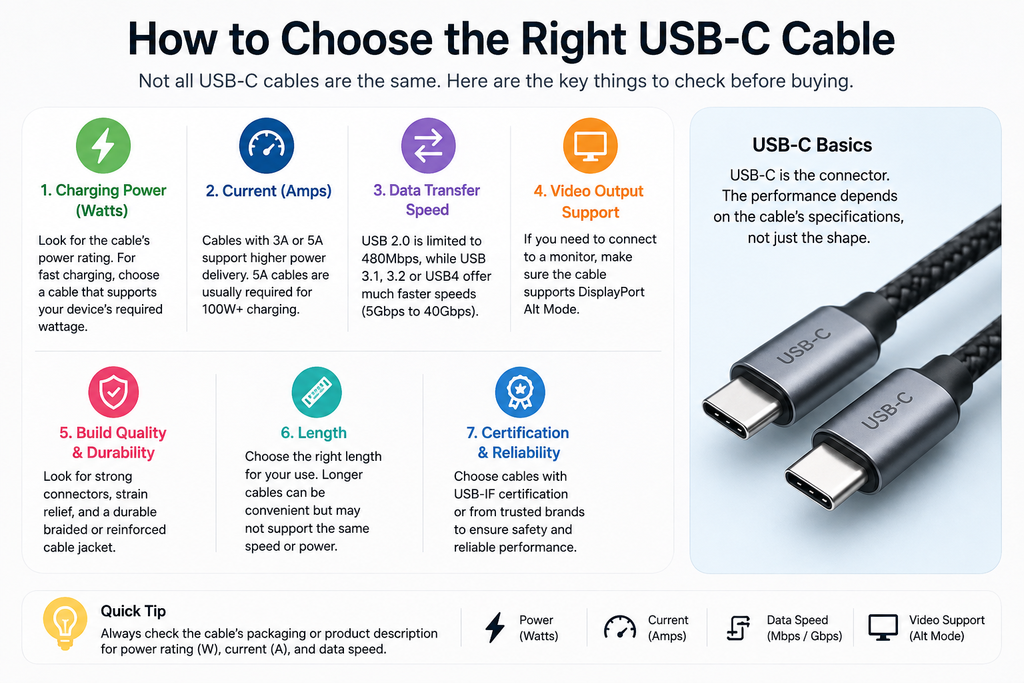
Start by deciding what you actually need the cable to do.
Are you buying it mainly to:
- Charge a smartphone?
- Fast-charge a tablet?
- Charge a laptop?
- Transfer photos and videos?
- Connect an external SSD?
- Connect a monitor or other USB-C accessory?
A cable that works perfectly for charging a phone may not be suitable for high-speed data transfer or demanding laptop use.
For example, a basic USB 2.0 USB-C cable can support USB Power Delivery, but its data capability remains limited to USB 2.0 speeds. USB-C itself does not automatically mean USB 3.2 or USB4.
The best cable is therefore the one that matches your device and your actual use.
Are All USB-C Cables the Same?
No.
This is one of the most important things to understand before buying a USB-C cable.
Two cables can have the same USB-C connectors but support different:
- Charging power
- Data speeds
- USB standards
- Video capabilities
- Cable construction
- Length
- Power-delivery features
USB-C describes the connector ecosystem, not one single performance level.
For example, one USB-C cable may support only USB 2.0 data while another may support USB 3.2 or USB4.
That’s why simply seeing “USB-C” on the package isn’t enough.
How Many Watts Is USB-C Fast Charging?
There is no single wattage that defines all USB-C fast charging.
The charging speed you actually get depends on the phone, charger, cable, and charging standard working together.
USB Power Delivery (USB-PD) can support substantially higher power levels. However, that does not mean a high-wattage USB-C cable will make every phone charge at that maximum power.
If your phone supports a lower charging power, it will not suddenly charge at the cable’s maximum rating.
If you are also choosing a charger, see our guide on how to choose the right mobile charger for your device.
What Should You Check?
Look for the charging requirements of your device and charger, then choose a cable that supports at least those requirements.
For ordinary smartphone charging, you may not need an extremely high-power cable. For laptops and other higher-powered devices, cable power capability becomes much more important.
What Does a 5A Type-C Cable Mean?
When you see 5A on a USB-C cable, it refers to the cable’s current capability.
Current is measured in amperes (A), while power is measured in watts (W).
A simplified relationship is:
Power = Voltage × Current
A cable capable of carrying higher current can support higher power when the rest of the charging system is designed for it.
However, don’t buy a 5A cable simply because the number sounds better. Your charger and device must also support the required charging power.
For everyday phone charging, a properly specified cable that matches your device may be all you need.
Is USB 3.1 or 3.2 Better?
If you’re buying a USB-C cable mainly for data transfer, the USB data specification matters.
USB 3.1 and USB 3.2 refer to data-transfer technologies rather than the physical USB-C connector itself.
The important point for shoppers is simple:
Don’t assume a USB-C cable is automatically a high-speed data cable.
A cable designed primarily for charging may have much slower data capabilities than a cable designed for high-speed transfers.
If you frequently transfer large video files, photos, or other data, check the advertised data rate before buying.
USB-C cable packaging may identify different power and data capabilities, so checking the specifications can help you avoid buying a cable that is slower than you expected.
What USB-C Cable Do I Need for My Phone?
For most smartphones, start with three questions.
Does It Support the Phone’s Charging Speed?
Check your phone’s maximum supported charging power and choose a cable that can handle it.
Does It Work With Your Charger?
A USB-C-to-USB-C cable is commonly used with modern USB-C chargers, while some older chargers may have a USB-A port and require a USB-A-to-USB-C cable.
Do You Need Fast Data Transfer?
If you only charge your phone and occasionally transfer small files, you may not need a premium high-speed data cable.
But if you regularly move large files between your phone and computer, a faster-rated cable can be worthwhile.
If you also use a power bank, our guide to 10,000mAh vs 20,000mAh power banks explains how capacity affects charging needs and portability.
Don’t pay for capabilities you won’t use.
How Do You Choose a Good USB-C Cable?
After checking power and data specifications, consider the cable’s physical quality.
A cable that technically supports your requirements isn’t very useful if the connectors become loose or the cable starts failing after a short period.
Look for:
- Strong connectors
- Good strain relief around the plugs
- A durable outer covering
- Appropriate length for your setup
- Clearly stated power and data specifications
- Reliable certification or compliance information where available
What Cable Length Should You Choose?
Shorter cables can be convenient for power banks and travel, while longer cables can be useful beside a bed or desk.
But don’t buy an unnecessarily long cable simply because it looks convenient. Choose a length that works comfortably for your setup.
Common USB-C Cable Mistakes to Avoid
Assuming Every USB-C Cable Supports Fast Charging
The USB-C connector alone doesn’t tell you the cable’s maximum charging capability.
Assuming Every USB-C Cable Has Fast Data Transfer
A USB-C cable can use the connector while still having relatively limited data capability.
Buying Only by the Watt Number
A high-wattage cable won’t automatically make your phone charge faster. Your phone and charger also have to support the charging power.
Ignoring the Cable When Buying a Fast Charger
A powerful charger and compatible phone can still be limited by an unsuitable cable.
Choosing the Cheapest Cable Without Checking Specifications
Price alone doesn’t tell you whether a cable has the power, data, and construction quality you need.
How to Choose the Right USB-C Cable for Your Needs
The right USB-C cable isn’t necessarily the most expensive or the one with the highest numbers on the package.
Instead, match the cable to what you actually need.
For basic phone charging: Choose a reliable cable with enough power capacity for your phone.
For fast-charging phones: Check the phone’s charging requirements and make sure the cable can support the necessary power.
For laptops: Pay closer attention to power capability because higher-powered devices can require substantially more power.
For transferring large files: Prioritize the cable’s data-transfer capability rather than looking only at its charging rating.
For everyday use: Durability, appropriate length, and reliable specifications may matter more than buying the highest-performance cable available.
The most important lesson is simple: USB-C is a connector, not a guarantee of performance. Check the cable’s power and data capabilities before you buy, and you’ll have a much better chance of getting the performance you expect.
Pingback: SSD vs HDD: Which One Should You Actually Buy?