
Choosing between a 10,000mAh and 20,000mAh power bank looks simple at first. The 20,000mAh model holds roughly twice the rated capacity, so it may seem like the obvious choice.
But bigger isn’t automatically better.
A 20,000mAh power bank is usually larger and heavier, while a 10,000mAh model is easier to carry. Your phone’s battery size, how often you need to recharge, how many devices you carry, and how much weight you are willing to carry all matter.
So which one should you buy?
For most people who simply want backup power for one phone, 10,000mAh is the more convenient everyday choice. If you regularly spend long periods away from a power outlet or need to charge several devices, 20,000mAh can be worth the extra size and weight.
What Does 10,000mAh or 20,000mAh Actually Mean?
The mAh (milliamp-hour) number describes the amount of electrical charge a power bank’s battery is designed to store.
In simple terms:
- 10,000mAh = less stored energy, usually smaller and lighter
- 20,000mAh = roughly twice the rated capacity, usually larger and heavier
However, don’t expect a 10,000mAh power bank to transfer exactly 10,000mAh into your phone.
Energy is lost during the conversion from the power bank’s internal battery voltage to the voltage used by your device. The cable, circuitry, heat and charging process also affect how much energy ultimately reaches your phone.
That’s why the number printed on the box should be treated as a capacity rating, not a promise of exactly how many times your phone will charge.
How Many Times Can a 10,000mAh Power Bank Charge a Phone?
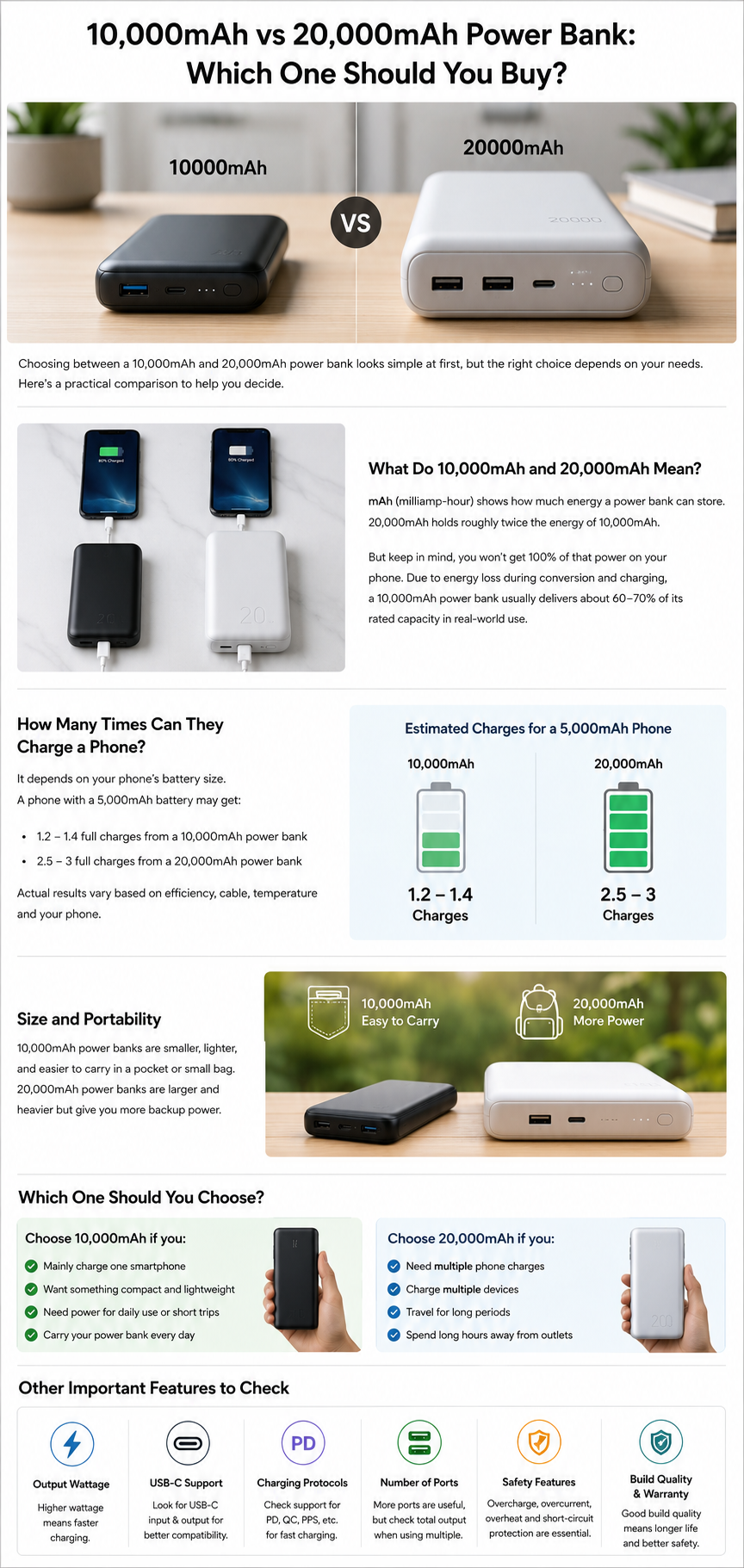
This depends on your phone’s battery capacity and the efficiency of the power bank.
For example, a phone with a roughly 5,000mAh battery will not necessarily receive two complete charges from a 10,000mAh power bank.
If you assume a typical real-world conversion efficiency of around 60–70%, a 10,000mAh power bank might provide roughly 6,000–7,000mAh of usable output under simplified conditions. Actual results vary considerably by model, charging protocol, cable, temperature and device.
So think of 10,000mAh as backup power for your phone, rather than simply dividing the power-bank capacity by your phone’s battery capacity.
If you’re deciding whether your current phone still meets your needs, you may also find our guide on signs you should replace your phone useful.
Is a 10,000mAh Power Bank Enough for Everyday Use?
For many people, yes.
A 10,000mAh model makes sense if you:
- Mainly charge one smartphone
- Want something easy to carry
- Need emergency power during the day
- Commute to work or school
- Take short trips
- Don’t want a heavy accessory in your bag
Its biggest advantage isn’t just capacity. It’s portability.
A power bank that is small enough to carry comfortably is more useful than a larger one that you regularly leave at home because of its weight.
Is a 20,000mAh Power Bank Worth Buying?
A 20,000mAh model becomes more attractive when you need more backup power rather than maximum portability.
It can make sense if you:
- Travel frequently
- Spend long days away from electrical outlets
- Use your phone heavily
- Carry more than one device
- Need several phone top-ups
- Want extra backup during long journeys or outages
The trade-off is size and weight.
A 20,000mAh power bank generally needs more physical battery capacity than a 10,000mAh model, so it is usually less convenient to carry around in a pocket.
10,000mAh vs 20,000mAh: Which Is Easier to Carry?
This is one of the biggest differences between the two.
If you walk around with your power bank every day, even a few hundred extra grams can become noticeable.
A 10,000mAh power bank is generally the better choice for:
- Pockets
- Small bags
- Daily commuting
- Short outings
- Minimalist travel
A 20,000mAh power bank is better suited to:
- Backpacks
- Long journeys
- Camping
- Multi-day travel
- People carrying several devices
The best capacity is therefore not simply the one with the biggest number. It is the one you will actually be comfortable carrying.
Does a 20,000mAh Power Bank Charge Faster Than a 10,000mAh One?
No—not necessarily.
This is an important distinction.
The mAh rating tells you about capacity, while watts tell you about charging power.
For example, a 10,000mAh power bank with a 30W USB-C output can potentially charge a compatible phone faster than a 20,000mAh power bank with only a 10W output.
So don’t assume:
Higher mAh = faster charging.
When comparing two power banks, check:
- Maximum output wattage
- USB-C output
- Supported charging protocols
- Whether your phone supports those protocols
Capacity tells you how much backup power you have. Output power helps determine how quickly your device can receive that power.
What Wattage Should You Look for in a Power Bank?
There isn’t one wattage that is right for everyone.
If you mainly want to charge a smartphone, a moderate USB-C fast-charging output may be sufficient.
If you want to charge a tablet or laptop, you may need considerably more output power and the correct USB Power Delivery support.
This is why you should check your device’s charging requirements before choosing a power bank.
A high-capacity power bank with inadequate output may give you lots of stored energy but still charge your device slowly.
Is USB-C Important When Buying a Power Bank?
For most buyers, USB-C is an important feature to look for.
A power bank may use USB-C for:
- Charging the power bank itself
- Charging your phone or other devices
- Supporting faster charging
- Working with modern USB-C cables
But don’t assume that every USB-C port provides the same performance.
Check whether the USB-C port supports input, output, or both, and look at its maximum wattage.
A power bank with USB-C output can be much more useful than one with an older or limited charging connection, particularly if your phone and other devices already use USB-C.
Should You Buy a 10,000mAh or 20,000mAh Power Bank for Travel?
For short trips, a 10,000mAh power bank may be enough if you mainly need emergency phone charging and want to keep your luggage light.
For longer journeys, a 20,000mAh model can provide more flexibility when outlets aren’t easily available.
Before traveling with a power bank, check your airline’s current rules and the applicable aviation regulations for your journey.
For example, at a nominal battery voltage of 3.7V, a 20,000mAh battery corresponds to approximately 74Wh:
20,000 × 3.7 ÷ 1,000 = 74Wh
Always check the actual rating printed on the power bank and the current rules of your airline before flying.
Which Power Bank Is Better for Multiple Devices?
If you regularly carry a phone, earbuds, tablet or another USB-powered device, 20,000mAh is generally more practical.
You have more stored energy available, and you don’t have to recharge the power bank as frequently.
But capacity isn’t the only thing to check.
Look at the number of ports and the power available when multiple devices are connected. Some power banks reduce the output available to each device when several ports are being used simultaneously.
So if you regularly charge several devices, check the total output and the output available from each port—not just the number of ports.
What Should You Check Besides mAh?
Capacity is important, but it should not be the only thing you compare.
Before buying, check these specifications:
Output Wattage
Make sure the power bank can provide enough power for your phone or other devices.
USB-C Support
Check whether USB-C is available for both input and output and what charging standards it supports.
Charging Protocols
If your phone supports a particular fast-charging standard, look for a compatible power bank rather than assuming every “fast charging” product will provide the same result.
Size and Weight
A larger capacity can mean more weight. Decide how portable you need the power bank to be.
Number of Ports
More ports can be useful when charging several devices, but check the actual output available when using them together.
Safety Features
Look for reputable products with appropriate protection against issues such as overcharging, overheating, overcurrent and short circuits.
Build Quality and Warranty
A cheap power bank isn’t a good deal if its construction is poor or the manufacturer provides little support.
Is a Cheap 20,000mAh Power Bank Better Than a Good 10,000mAh Model?
Not automatically.
A large capacity number can make a product look attractive, but capacity alone doesn’t tell you everything about the power bank’s quality.
A good 10,000mAh model with appropriate output, USB-C support, safety protections and reliable construction can be a better purchase for an everyday phone user than a poorly made 20,000mAh model.
This is one of the most important lessons when comparing power banks:
Don’t buy the biggest number. Buy the specifications that match your actual needs.
Which One Should You Buy: 10,000mAh or 20,000mAh?
The decision becomes much easier when you look at your normal use.
Choose 10,000mAh if:
- You mainly need backup power for one phone
- You want something compact
- You carry your power bank every day
- You take short trips
- You don’t want unnecessary weight
Choose 20,000mAh if:
- You need multiple phone charges
- You travel for longer periods
- You charge several devices
- You spend long periods away from outlets
- You don’t mind carrying a larger power bank
The Simple Answer: 10,000mAh or 20,000mAh?
If you are buying a power bank mainly for everyday smartphone backup, start by looking at 10,000mAh models.
If you frequently need more than one phone charge, charge multiple devices, or travel for long periods, a 20,000mAh model is likely to be the more useful choice.
But whichever capacity you choose, don’t stop at the mAh number. Check output wattage, USB-C support, charging protocols, size, weight, safety features and build quality before making your purchase.
The right power bank isn’t the biggest one you can afford. It’s the one that gives you enough backup power without making you carry more than you actually need.
Pingback: 10,000mAh Power Bank: How Many Charges Can You Get?
Pingback: How to Choose the Right Mobile Charger for Your Device | Buy Wanta
Pingback: How to Choose the Right USB-C Cable: 7 Things to Check